Free
$0
One site
- Manual blur on the first site you blur
- Show or hide blurs while you present
- Blurs stay in this browser
Chrome extension
Before share
PlainBlur is a Chrome extension. Click an element or drag an area. Those parts blur in the browser, so they are harder to read while you present. The page is not uploaded.
Add to ChromeListing
The Chrome Web Store listing is not available yet. This button does not install PlainBlur. There is no store listing URL. Until a listing exists, load the unpacked extension from the extension/ folder in the repository. The public site is plainblur.com.
How it works
01—03
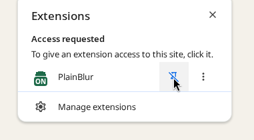
Open it from the Extensions menu. Pin it once so it stays in the toolbar.
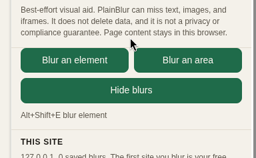
Choose Blur an element or Blur an area, then click or drag what should stay private.
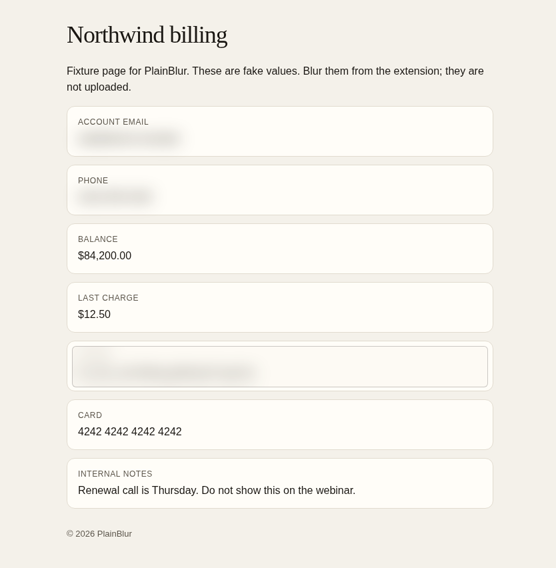
Sensitive fields stay frosted. Choose Hide blurs when you need the clear view.
Pricing
Lifetime
$0
One site
$49
Lifetime · 1 seat
$99
Lifetime · 5 seats
Seat
A seat is one browser. Remove it in the popup to free it. There is no account and no cloud sync of blurs. Checkout starts from the extension popup. This page does not take payment.
Limit
Best-effort visual aid. PlainBlur can miss text, images, canvases, and iframes. It does not delete data, and it is not a privacy or compliance guarantee. Page content stays in the browser. A short flash of the unblurred page is possible before a blur is applied.